 ilovethesmiths
I LOVE THE SMITHS AI · BUYING GUIDE
Best I Love The Smiths AI Video Generators in 2026: 5 Tools Compared
Which generator fits your photos and budget? This guide compares five dedicated I Love The Smiths AI templates by the choices that matter before paying: role replacement, output format, purchase cost and previews.
What changed — Prepared a separate five-tool buying guide with official sources, screenshots, a demonstration video and related site guides.
The Short Answer: Which Generator Should You Choose?
Consider Reeldo for two-photo resolution choices, Starrd for a simple template with optional notes, SameVid for replacing one or both people, PugSoda for a one-time purchase, and Bulin47 Video for a short preview before unlocking.
There is no independently tested quality winner here. These recommendations match advertised workflows to your needs; they do not establish which service produces the best likeness, motion or lip synchronization.
Compare the cash you must pay, not just credit counts. A preview, a reference clip and a finished generated video provide different kinds of evidence.
Article Updates
- Checked five official product pages and separated purchase choices from untested quality claims.
- Added interface screenshots, an existing site demonstration and links to the creation tutorial, tool directory and pricing.
Publisher disclosure: This article is published by I Love the Smiths, which operates its own photo-to-video generator. The five external tools below are compared by published features, not a tested quality ranking. For broader discovery, read Where to Make an I Love The Smiths AI Video; for instructions, use our How to Make tutorial.
Quick Comparison: Five I Love The Smiths AI Generators
| Tool | Photos | Length | Output | Published cost |
|---|---|---|---|---|
| Reeldo AI | 2 | 15s | 480p / 720p · 16:9 · sound | 125 / 282 credits |
| Starrd | 2 | 15s | Export resolution and ratio not confirmed | 150 credits |
| SameVid | 1–2 | 14s | 720p · 16:9 · reference sound | 380 credits |
| PugSoda | 2 | 19s | 480p / 720p · 16:9 · sound | $7.90 / $9.90, or 79 / 99 credits |
| Bulin47 Video | 2 | 14s | 480p / 720p · 16:9 · template voices | $9.99 unlock advertised; 10 / 22 credits also listed |
Budget for the minimum purchase, selected quality and possible retries. Do not treat a smaller credit number as a lower price or a higher resolution as proof of better facial resemblance.
Which Tool Fits Which Need?
1. Reeldo AI — Two-photo resolution choices
The dedicated page assigns the listener and speaker to separate uploads and offers Draft and Standard settings. Its approximate dollar figures use a discounted annual-plan rate.
Before paying: Check the actual pack or subscription needed. A quoted per-video dollar equivalent is not necessarily what a new customer pays.
2. Starrd — A simple template with optional notes
Two labeled upload positions and optional Director’s Notes keep the setup focused on the participants. The page supplies the scene instructions.
Before paying: Confirm the available credit packs, final resolution, audio and watermark details before purchasing. A template example alone does not answer every export question.
3. SameVid — Replacing one character or both
The listener and speaker slots are optional individually, with at least one portrait required. This is a useful distinction if only one participant wants to appear.
Before paying: Check the credit-pack purchase minimum. The template is landscape, so a vertical edit may need reframing.
4. PugSoda — A one-time video purchase
The page offers a single-video purchase without an account and delivers an order link by email. It describes retry or refund handling for failed generations.
Before paying: Its failure policy is distinct from dissatisfaction with facial resemblance. Read the current terms; the longer clip also differs from a 14–15-second edit.
5. Bulin47 Video — A short preview before unlocking
The page advertises a watermarked two-second 480p preview, with eligibility limited per Google account. It uses template voices rather than cloning the uploaded people’s voices.
Before paying: The page lists both a cash unlock and resolution-based credits. Confirm the selected checkout route and quality. Two seconds cannot establish consistency across the full clip.
Screenshots and a Video: What to Look For
Use the role labels, visible settings and full-video playback to evaluate a workflow. The screenshots below show this publisher’s local interface captured November 10, 2026; they are not screenshots of the five external providers.
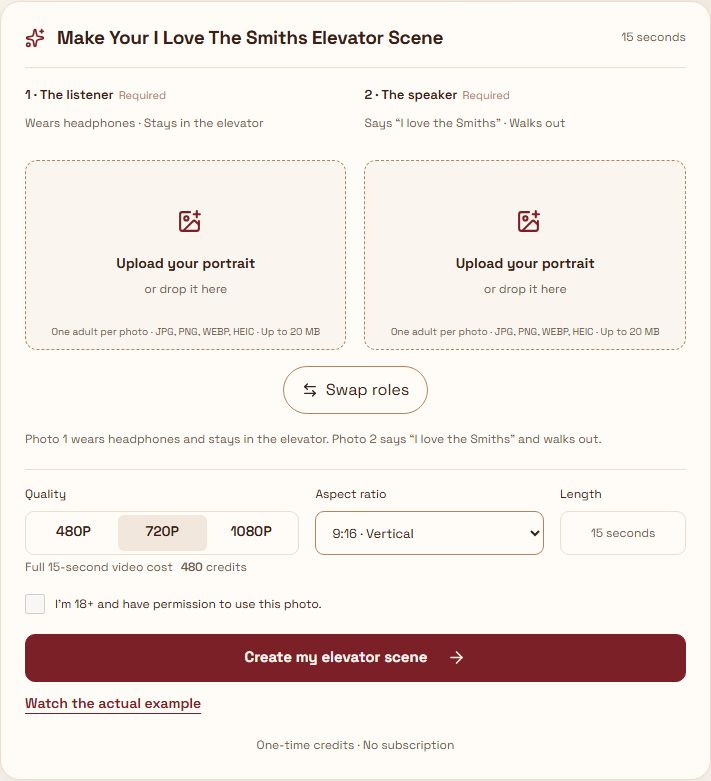

A provider’s reference clip shows the target scene; a labeled generated example shows one output; only testing with comparable inputs can support a quality comparison. This article does not perform that test.
Choose Based on Your Inputs and Purchase Preference
- Only one portrait: inspect SameVid’s optional role slots.
- Two portraits and a quality setting: compare Reeldo’s two resolutions with your budget.
- A simple preset with written adjustments: examine Starrd’s Director’s Notes.
- A single purchase without an account: check PugSoda’s order flow.
- A brief personalized preview: review Bulin47’s preview eligibility and unlock terms.
For this site’s workflow, start with the creation guide, check credit packs and review completed results in My videos (sign-in required). Read the refund policy or contact support before assuming a creative mismatch qualifies for a refund.
Frequently Asked Questions
Which generator has the best quality?
We cannot establish that from product pages. Compare actual full-length outputs made with similar photos and settings before judging face consistency or lip synchronization.
Are these generators free?
The listed full-video workflows are paid. Bulin47 advertises a limited preview; that is not a free complete download. Verify current eligibility before uploading.
Can I use one photo?
SameVid explicitly permits replacing one participant. The other entries above describe two-photo workflows; follow the selected template’s labels.
Does sound included mean I can publish the original song?
An advertised audio feature does not establish permission for your intended use. Our copyright and likeness guidance explains the site’s boundaries.
What should I check before uploading someone else’s photo?
Obtain permission and review the chosen service’s photo rules and retention terms. For this site, read our privacy policy, acceptable-use policy and terms.
Methodology and Official Sources
Reviewed November 10, 2026. We checked publicly advertised photo requirements, duration, format, price and preview conditions. We did not purchase or generate videos on the five services, verify refunds or score output quality. PugSoda’s details were available through the search-indexed official page when direct retrieval failed. Specifications can change.